.svg)
Table of Contents

Your customers are reaching out everywhere. Email, SMS, WhatsApp, web forms, chat, and the occasional ill-timed phone call. Your team is juggling, copy-pasting, and losing context. The result: customer service slows down, marketing becomes inconsistent, and your CRM data suffers. An API-driven omnichannel platform fixes this chaos: it centralizes messages, connects channels, synchronizes information, and creates a single thread for each customer. This is exactly the logic behindOctopush : a communication-oriented solution (SMS marketing, campaigns, API sends) that helps businesses streamline their communications and connect their workflows to their business tools, without juggling multiple interfaces.
How do I connect WhatsApp to my CRM?
The real question isn’t “how do I connect WhatsApp,” it’s “how do I avoid orphaned conversations.” To connect WhatsApp to a CRM, you need to link three elements: customer identity, channel, and history.
The winning approach
- A unique identifier (phone number or email)
- A conversation thread attached to the customer profile
- Triggering CRM events (lead, purchase, ticket, follow-up)
You get an omnichannel CRM management tool : every interaction enriches the profile, every action is tracked, and every team member sees the full context.
Pro tip: standardize your tags. “New lead,” “VIP,” “Support,” “Follow-up.” Without tags, omnichannel becomes just another pile of data.
Centralized WhatsApp and SMS API integration
WhatsApp is often used for conversation. SMS is used for urgency and reach. Integration via API allows you to switch automatically: WhatsApp if the customer responds and prefers that channel, SMS if you need to send an OTP, a reminder, or a short notification.
A quick tip: define the role of each channel. WhatsApp = exchange. SMS = quick action. Email = detail.
What is the best omnichannel platform?
The best platform isn't the one with the most logos. It's the one that fits your workflows and your teams. An omnichannel platform comparison must therefore start with your reality.
The criteria that matter
- centralization of messages (a true unified messaging interface)
- team-based permission management
- CRM and e-commerce integrations
- quality of support and documentation
- clear activity reporting (service, marketing, sales)
- simple automations (rules, scenarios, webhooks)
- ability to manage compliance, opt-ins, and unsubscribes
Pro tip: run a test on a single journey. For example: form → lead creation → welcome message → follow-up → conversion. A communication API solution test reveals weak points immediately.
CPaaS platform reviews: what you really need to read
Useful reviews cover: stability, deliverability, integrations, and support. "Too vague" reviews don't help. Look primarily for how the tool performs in production on a Monday at 9 a.m.
Why centralize your communication channels?
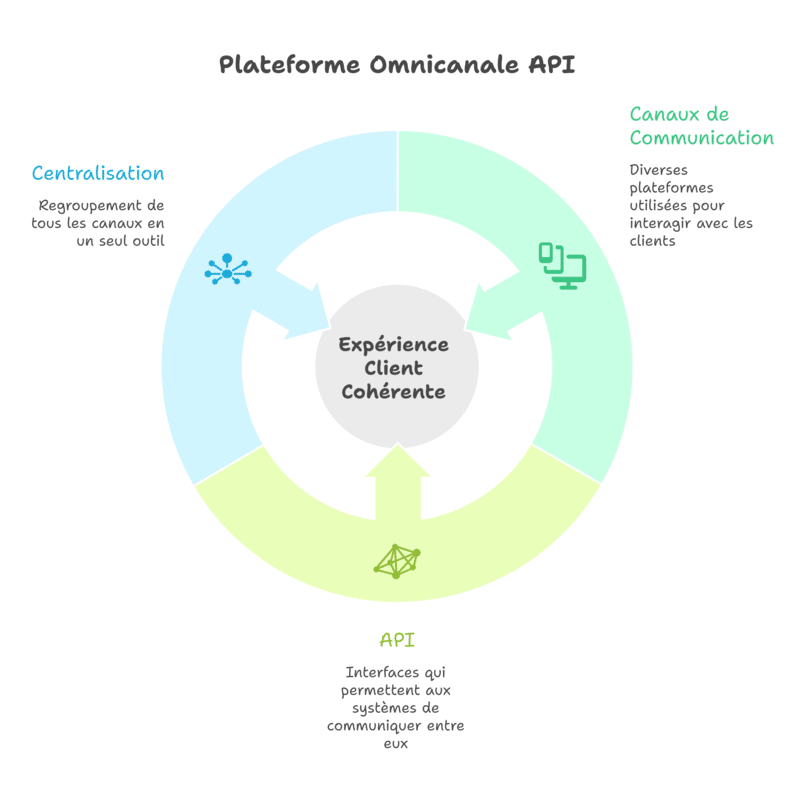
Because fragmentation is expensive. It costs you time, leads to errors, and results in lost opportunities.
Direct impact on customer service
- slower response times
- repeating questions
- duplicate tickets
- loss of tracking
- frustrated customers
Centralizing means giving your team full context. Support responds better, faster, and with less back-and-forth. An API platform for centralizing customer support becomes a driver of satisfaction, not just a gadget.
Quick tip: measure the time lost. "How many minutes does it take to find a conversation?" Multiply that by the number of tickets. You'll have your ROI.
Impact on marketing
Multichannel marketing without coordination just becomes noise. With an omnichannel platform, you align your campaigns: one message, multiple channels, and controlled frequency. You improve yourexperience instead of overwhelming.
How do you integrate a messaging API?
An API is useful when it simplifies things. It should do three things: send, receive, and track.
Simple integration steps
- Connect the API to your CRM / e-commerce platform
- Define trigger events (contact creation, order, ticket)
- Map the fields (name, phone number, status, segment)
- Set up routing rules (WhatsApp / SMS / email)
- Add basic reporting (sent, replied, converted)
You are building an integrated communication solution : the message is no longer "outside the system." It becomes an event in your management workflow.
Pro tip: start with a transactional flow. For example: OTPs, order confirmations, or delivery tracking. It’s clean, measurable, and stable.
What is a CPaaS platform?
A CPaaS platform (Communications Platform as a Service) provides communication building blocks via API: SMS, voice, WhatsApp, email, notifications, and sometimes RCS. You integrate these channels into your application or CRM without having to develop the entire backend.
A CPaaS becomes a channel centralization tool when it adds a management layer: workflows, reporting, contact management, and compliance.
(Quick side note: a pure CPaaS serves developers. An omnichannel platform also serves frontline teams.)
How to succeed with your omnichannel strategy?
Omnichannel fails for one simple reason: you start with the channels, not the journey.
1) Define customer journeys
Choose a maximum of 3 journeys to start with:
- new lead → conversion
- abandoned cart → purchase
- support ticket → resolution
Then, you automate. You measure. You refine.
Rule of thumb: one campaign = one intent. One intent = one primary message. One primary message = one priority channel.
2) Unify your data
Without clean data,AI is useless, your CRM gets cluttered, and your messages miss the mark. Unify:
- customer identity
- consent
- interaction history
- status (lead, customer, VIP)
- last action
Pro tip: block duplicates. A duplicated customer leads to two conflicting experiences.
3) Managing marketing pressure
Set a simple rule: a maximum of X messages per period, across all channels, excluding transactional ones. You protect the experience.
How can you synchronize customer messages in a single tool?
You need to create a conversational "source of truth." One thread per customer. A shared history. Internal transfer rules.
Best practices
- a unique identifier per customer
- internal notes within the thread
- prioritization tags
- response templates
- a simple SLA (response within X hours)
You move from multi-channel chaos to a system. Your team gains speed. Your customers gain clarity.
Where does Octopush fit into this model?
Octopush serves as a communication building block, useful when you want to send, track, and automate messages via our platform and via API. You can manage SMS sends, campaigns, and notifications, and connect your systems to trigger the right messages at the right time. The value is clear in two scenarios:
- e-commerce customer service : confirmations, tracking, follow-ups
- marketing : segmented campaigns, mobile activation, multi-channel consistency
Pro tip: start with a high-ROI flow: OTP, abandoned cart recovery, or status notifications. You'll see results fast.